
About Mike

If you're reading this, you probably know me. If not, poke around and maybe you'll learn something.

Waiting for the iPhone

As an admitted Apple fan, I, like many, am waiting for next month’s release of Apple’s iPhone. Since I have some concerns about the features, contract requirements, and price, I’m not certain that I will be getting one, but it is certainly a possibility. I’ll have to see what the initial reviews are and see if I can get my hands on one for

While I’ve been waiting, I decided to see how capable my current phone is. Surprisingly, quite a bit. I have a Sony Ericsson S710a which I got about two years ago and only used it for voice as I never saw the need for paying for a data plan and would rather call someone than “text” them.

The goals I was shooting for was to as closely emulate my “Internet presence” that I can obtain on my computer via my phone. That includes having a respectable browser, access to my mail server (via imap), and IM (AIM or Google Talk) availability.

The first step was to add data to my wireless service. AT&T (formerly Cingular Wireles, formerly AT&T Wireless) has a MediaMAX 200 service which includes unlimited gprs/EDGE data and 200 sms messages a month for $19.99. Not too bad and I’m surely going to get my money’s worth this first month. I can scale it back later if I will be using less.

Next, the browser. Opera Mini is a free java browser by Opera Software. It’s a decent browser and while I kinda wish it rendered the full page rather than thinning down the page for display, it is probably the better way to go to improve speed and reduce the amount of data transferred.

Email support also worked out. The built-in email program supports imap and even can do SSL (encrypted) connections. The only down-side was that server certificates have to be smaller and the 4096 bit cert I got from CAcert for my imap server couldn’t be imported into my phone so I ended up generating a 1024 bit self-signed cert which did work. After importing, the phone can see my inbox and can even check mail on a schedule, but I’ll keep that disabled.

Lastly is instant messaging. The phone has an AIM client built in and while it looks reasonable, I don’t like it and am trying to find a Java client that supports Jabber (Google Talk) as well as AIM and uses the data network rather than SMS messages (which is metered with the current plan).

I think I still will end up getting an iPhone but I certainly am having fun seeing how functional a device that I used to just take and make calls on can be.

Powered by ScribeFire.
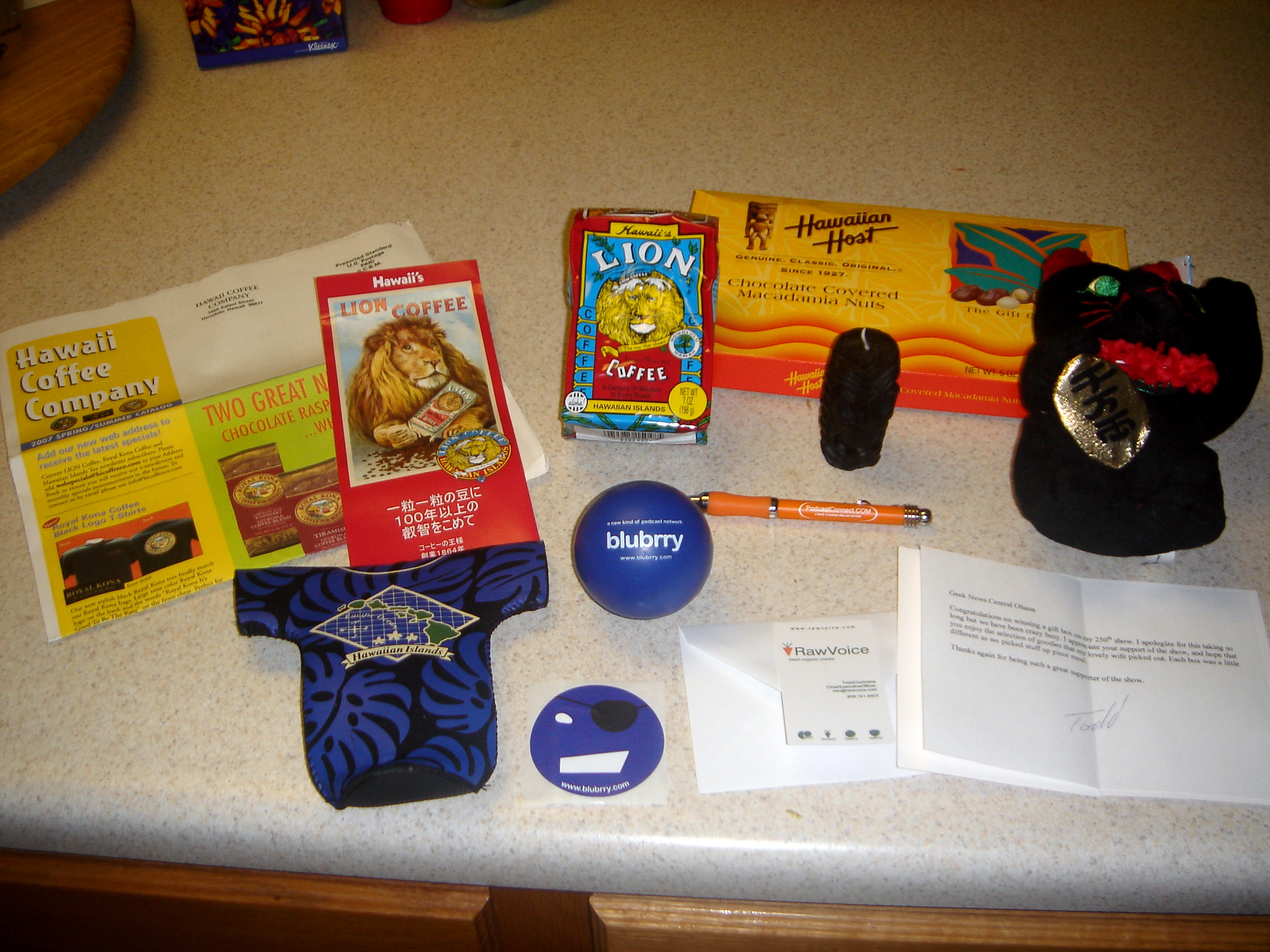
And it’s not even my birthday

I’ve been a long time listener to the Geek News Central podcast and to celebrate his recent 250th episode, he asked 10 listeners to call in for a very special gift box. Due to my ever-so-early 5:00 AM drive in to work, it wasn’t hard for me to leave him a quick voicemail. I don’t know if I was the first, but I was one of the ten as he announced my name the following episode.

Fast forward today and I was the happy recipient of quite a nice hand-crafted box of very thoughtful and Hawaii-oriented items:

A gift box from Geek News Central

From left to right. Back row: Lion Coffee catalog and 7 oz of Fancy Roasted Coffee, Hawaiian Host Chocolate Covered Macadamia Nuts, a Tiki Candle (“Ku” the god of war), a good luck cat (inscription “Ten Million” for much wealth). Front row: Aloha Bottle Jacket, blubrry sticker and stress ball, a PodcastConnect.com pen, and a note card. Not pictured: A teak napkin holder.

The card reads:

Geek News Central Ohana

Congratulations on winning a gift box on my 250th show. I apologize for this taking so long but we have been crazy busy. I appreciate your support of the show, and hope that you enjoy the selection of goodies that my lovely wife picked out. Each box was a little different as we picked stuff up piece meal.

Thanks again for being such a great supporter of the show.

–Todd

It was a very generous gift and I really appreaciate the effort and expense. Give his show a listen, it really is a fun podcast.

Can the PS3 save humanity?

Folding@Home PS3 screenshotO.k. that title is a bit over the top, though it is interesting and possible with recent developments. Stanford University has since 2000 been sponsoring a distributed processing project called Folding@Home who’s goal is “to understand protein folding, misfolding, and related diseases.” A recent update to the firmware of the Playstation 3 added a Folding@Home client which has been optimized to take advantage of the multi-core cell processor present in the console. Since that processor was designed for extreme math performance, it was a smart idea to make use of it.

The results are impressive. When I looked this morning at the OS Stats page, the PS3 represented only 16% of the active CPUs but have produced 65% of the recent output. It takes about 63 PS3 (and their 7-8 cores) to produce a TFLOP (teraflop) of computing power compared to 1048 Windows-based PCs to produce the same results.

I look forward to seeing the long-term benefits from all of the additional power.

powered by performancing firefox

An ode to a teacher

My son is in 1st grade and has developed quite a crush on his teacher. One of the more recent notes he gave to her said:

“I can’t get you out of my brain. I don’t want to get you out of my brain.”

He’s got it bad.

Information: Who is serving whom?

I got bit by the RSS bug about two years ago as I used to frequent the same 15-20 websites daily and being able to subscribe to them made keeping up much easier and reduced the chance of me missing something because I didn’t check often enough.

For the unfamiliar, RSS is a way to publish the essential information about a blog post, news article or similar data and make that available to anything that can parse and display that information (e.g., a browser, application, or web service). Podcasts are distributed in this fashion with your “podcatcher” occasionally checking the feed and downloaded a new episode for you.

I used to use Bloglines but am currently enjoying Google’s Reader and am subscribed to 67 different feeds. With a good portion producing new information daily and a few several times an hour, the amount of content is considerable.

A good friend of mine was lamenting to me how his “TiVo chores.” TiVo has an option to automatically record shows it thinks you will like in addition to the shows you tell it to record. For him, he has to make a point to sit down and filter through and/or watch all the shows before he gets too behind. Similarly, for me, I check Google Reader multiple times a day to ensure that I don’t get too far behind.

So having said all of that, the question I have to ask is are we being served ball all this information or are we instead allowing ourselves to be overwhelmed by things that don’t really matter? I could probably read only a fraction of the items that I wade through and not be the worse for it, but my compulsive side would make me obsess about the things I didn’t read.

The second complaint another friend of mine made was the fact that by digesting website information via RSS you can often miss out on the other things you see if you visit the website directly. Things like comments, related links, and even in some cases, ads. “Browsing” in the general sense is lost. In the context of a printed newspaper, if you read only the front page, you miss all sorts of content on page 3 or in the Lifestyles section (not to mention the classifieds).

I’m not sure what the answer is, but I can’t help but think there is a considerable amount of growing up and learning we will all have to do to find a balance between the information serving us and us serving the information.

Even Disneyland overbooks flights

The family and I we to Disneyland today in the hopes to get another visit in before the upcoming “season of birthdays” that generally occupy every weekend from the beginning of March through May.

One of the rides we always enjoy going on is Soarin’ Over California at Disney’s California Adventure. As we always do, we made our way over to the ride and after waiting in line for a bit got in to take our seats. Becky and Brian were ahead of me and they were trying to determine which seats were theirs and then sat down, as did Kaelyn. Unfortunately, so did the group behind me leaving me without a seat. Sure, I could have gotten a little upset with the whoman who was inadvertantly sitting in what was supposed to be my seat, but the fact was the operator put too many people in our line. As a result, somebody had to get bumped. I decided to take the high road and just take a pass and let the others enjoy the ride. I simply exited the ride and waited in the exit hallway for them.

Brian was quite upset that I missed it so I asked if we could ride again. Fortunately, the operator was sensative to his error and was happy to let us all ride again after the group that was currently being seated was done. So, we were able to exit out the entrance and line up all anew. We took the added advantage to place ourselves in the sweet spot for the ride (the “cars” are in a 3×3 matrix before a parabolic screen so the center row (B2) is in the center of the screen and has the least distortion. They family got do ride it twice in succession and I got to get a decent story to blog about.

powered by performancing firefox

Link previews in a snap

I just added a cool little plug-in that provides previews for external links. The service is provided by snap and using the Snap Preview Anywhere Plugin for WordPress, I get the preview automatically added to any link that goes outside of this blog. I tried to make it less obtrusive by using an icon just after the link that when you hover over will pop-up the preview. The normal text link acts as normal.

You are supposed to be able to disable it in the options of the pop-up if you don’t like it. If you experience any problems, please let me know.